写在前面
为什么会出现IPC这个概念,Android操作系统为了确保进程之间不会产生相互干扰,就是为了你挂了不会影响我,所以采用了进程隔离的机制,即为每个进程分配独立虚拟地址空间,进程之间感觉不到彼此的存在,感觉自己仿佛占用整个内存空间。这样保证了进程的数据安全,但是必然存在另外的问题,那就是进程间通信,进程不可能完全独立运行,有时候需要相互通信获取别的进程的运行结果等,因此需要想办法解决进程间通信的问题,所以就出现了IPC这个概念。其他就不说了,假设我A应用要去B里面应用获取的数据该怎么办,接下来我们就写这么一个实例,这里就涉及到两个单独的应用,我们就把A应用作为客户端,B应用作为服务端。
应用服务端
1
2
3
4
5
| // 编写aidl文件
interface UserAidl {
String getUserName();
String getPassWord();
}
|
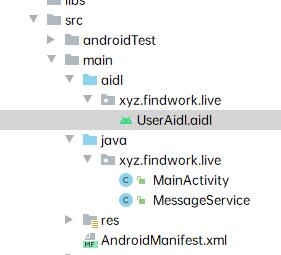
路径如下
创建MessageService
1
2
3
4
5
6
7
8
9
10
11
12
13
14
15
16
17
18
19
| public class MessageService extends Service {
@Nullable
@Override
public IBinder onBind(Intent intent) {
return mBinder;
}
public UserAidl.Stub mBinder = new UserAidl.Stub() {
@Override
public String getUserName() throws RemoteException {
return "loki@qq.com";
}
@Override
public String getPassWord() throws RemoteException {
return "123456";
}
};
}
|
在manifest中声明
1
2
3
4
5
6
| <service android:name=".MessageService">
<intent-filter>
<action android:name="xyz.findwork.live.user" />
<category android:name="android.intent.category.DEFAULT" />
</intent-filter>
</service>
|
服务端启动
1
| startService(new Intent(this, MessageService.class));
|
客户端相同路径创建aidl文件,rebuild生成UserAidl.java接口文件,然后再activity中试用
1
2
3
4
5
6
7
8
9
10
11
12
13
14
15
16
17
18
19
20
21
22
23
24
25
26
27
28
29
30
31
32
33
34
35
36
37
38
39
40
41
42
43
44
45
46
47
48
49
50
51
52
53
54
55
56
57
58
59
60
61
62
63
64
65
66
| ···
private UserAidl userAidl;
private final ServiceConnection connection = new ServiceConnection() {
@Override
public void onServiceConnected(ComponentName name, IBinder service) {
//链接就绪
Log.e("service","onServiceConnected");
userAidl = UserAidl.Stub.asInterface(service);
}
@Override
public void onServiceDisconnected(ComponentName name) {
//取消链接
Log.e("service","onServiceDisconnected");
userAidl = null;
}
};
···
···
/**
* 绑定服务
*/
public void onclick1(View view) {
Intent intent = new Intent();
intent.setAction("xyz.findwork.live.user");
intent.setPackage("xyz.findwork.live");
bindService(intent, connection, Context.BIND_AUTO_CREATE);
}
/**
* 解绑服务
*/
public void onclick2(View view) {
if (userAidl!=null){
unbindService(connection);
}
}
/**
* 获取用户名
*/
public void onclick3(View view) throws Exception{
if (userAidl != null) {
String userPassword = userAidl.getUserName();
Toast.makeText(this, "用户名称:"+userPassword, Toast.LENGTH_SHORT).show();
} else {
Toast.makeText(this, "服务器未绑定或被异常杀死,请重新绑定服务端", Toast.LENGTH_SHORT)
.show();
}
}
/**
* 获取密码
*/
public void onclick4(View view) throws Exception {
if (userAidl != null) {
String userPassword = userAidl.getPassword();
Toast.makeText(this, "用户密码:"+userPassword, Toast.LENGTH_SHORT).show();
} else {
Toast.makeText(this, "服务器未绑定或被异常杀死,请重新绑定服务端", Toast.LENGTH_SHORT)
.show();
}
}
···
|